Open up your Ubuntu Hardy (or later version) file manager and press CTRL+F to start a search. You'll notice that it's slow and only searches by name. Sure, you've got the deskbar (unless you're using a recent version of Ubuntu) and can get Trackerfull text search, but why wouldn't you want Tracker integrated with Nautilus? Well, it turns out that a lot of people didn't want it and the integration was stopped after Gutsy (what a bone-headed decision that was!). Don't bother trying to report this as a bug, even though the Nautilus project and the Tracker project bothclaim integration with each other -- it'll just be marked "Invalid" or "Won't fix." Wake up. Modern desktops have this kind of integration.
So what's a person to do? Are you going to run off to another Gnome distro which doesn't do this? You have the power of the source. Use the source, Luke! Fix your crap. It's an easy cut and paste job for you. Just open a terminal and paste the following in (I'll explain later what each part does):
You should now have a near-instant search via full-text Tracker. Have fun.
The explanation
We're going to need to recompile nautilus, so we need to get the build dependencies for Naultilus. The first line does this automatically without having to work through everything manually.
Since the Tracker dependencies weren't installed, we need to include those. We also need fakeroot since we don't want to build as root -- fakeroot is a package which keeps us from needing to use those priveledges while building the package. Build-essential makes sure that we have all the build tools installed. I normally have them, and I'm not sure whether you actually need to have this package on the second line or not (due to build-dep above), but it doesn't hurt to have it and I don't want anyone's build failing. The backslash in the middle of that line makes a carriage return possible without executing the command.
We retrieve the source for Nautilus and automatically build it. Since Nautilus checks for Tracker during compilation, we don't need to mess with any compilation flags -- that's handled automatically.
We install the new packages.
We need to kill Nautilus to restart it.
Sometimes, changing your system to meet your needs is more difficult than this. I'll introduce you to one of those next week in Fix Your Crap 2.
Before I start this article, let me say that I'm not a big "make your Ubuntu desktop look like a Mac" kind of guy. I don't use a dock. I don't have an Apple icon on my top panel. I pretty much use straight Gnome. I even like the spatial view someitmes.
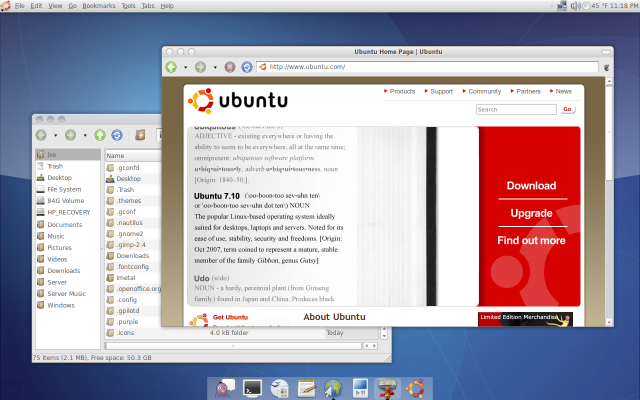
There are plenty of people who want the Apple desktop experience, though, and I'm going to tell you how to get it. No, I don't mean pixel-perfect themes. I mean the stuff that counts. Usability. There are three main elements to Apple's usability on the basic desktop: a dock, menus on the top panel, and a launcher. Lucky for us, Ubuntu 9.04 Jaunty makes all these pretty easy.
Let's start with the launcher, which in OS X is called Quicksilver. In Ubuntu, we have a worthy competitor in GNOME Do. It's already in the repositories and at version 0.8.1.3. Installing just means clicking this link. When you are finished, Press ALT-F2 and type "gnome-do" or launch it from Applications > Accessories.
When the two-panel (and rather ugly) application appears, click on the arrow in the upper-right corner to open the Preferences box. In the General tab, you'll want to set Gnome Do to start automatically and to hide on launch. Next, you need to enable some of the many plug-ins available for Do. Changing "Show: Official Plugins" to "Show:All Plugins" will give you many more choices. I suggest you enable the Tracker search, Google Apps, Flickr, micro-blogging (Twitter and Identi.ca), IM, browser, note, and music player plugins as a start. Some of these will require some configuration with user names and passwords.
Gnome Do appears with a press of the super or Windows key and the spacebar simultaneously. Instructions for using it are on the Gnome Do Wiki.
The next step in getting that OS X usability is to add a dock. Normally, people recommend Avant Window Navigator for this because it's quite a looker, but I'm going to recommend that you use the built-in dock in Gnome Do. You will need a compositing window manager in order to enable the dock. If you have Visual Effects enabled in Preferences > Appearance, then you are OK.
If you can't enable effects, you aren't out of luck yet. Metacity (Gnome's default window manager) can do compositing, though it's turned off by default. Hit Super-space to start Gnome Do and type "gconf-editor" and ENTER to launch the GConf editor. Under Apps > Metacity > General, put a check next to Compositing Manager and close the application.
To enable the dock, access the preferences in Gnome Do and change the theme to "Docky" in the Appearance tab. Bam! You're finished with the dock.
Another important aspect of OS X usability is the top menu, which conforms to Fisk's Law about where it should be placed. Personally, I have trouble getting used to it, but there's no doubt it's easier to hit than a menu on the window. Getting a top menu for GTK+ used to be the hardest part of this process, requiring patching and compiling, then later it was easier but required downloading and installing using force overwrite. These days, Gnome2-GlobalMenu has its own repository and is easy to set up. Add the following repository to Software Sources or manually in /etc/apt/sources.list
Download and add the key, then update and install gnome-globalmenu. Remove the menu and quick launchers on your top panel, right click and add the global menu and a normal ubuntu menu if you like.
Choose a theme like Dust Sand, and you're done. There's no real reason to move the traffic lights to the left, but you can if you want to by using the GConf editor and changing the "button Layout" under Apps > Metacity > General.
Average people just don't seem to learn when DRM shows how awful it can be. Yahoo!'s and Microsoft's music services were cancelled and their authorization servers were planned to be taken off-line. The suggested workaround? Burn the tracks to CD and rip them to a non-DRM format, losing cash, time, and a serious amount of fidelity in the process.
The biggest complaint I hear about moving to Gnome right now is that the person's iPod and previous iTunes purchases won't work. The iPod's DMCA-assured secret hasing and iTune's limit on moving older music purchases share a common trait: that's DRM locking you in. But that's all old news, isn't it?
The new news is not about music: it's about e-books. Same old nasty tasting poison -- different wrapper. Amazon controls how long you can read your Kindle books for. The details of the case in the link above aren't important. The banned customer may have abused a policy or he may not have. The result is the same: he not only loses his right to the returned books, but to all the books he legally purchased and didn't return. The message from Amazon is clear.
"All your book are belong to us." You don't own the books your bought, and Amazon can take them away time they are dissatisfied with you. You have no recourse.
Do yourself and the world a favor. Support open formats. Refuse to buy products which contain DRM. Let the vendors know they lost your sale. Use the non-DRMed products legally and within fair use guidelines.
If you read the paper, you'll find out two things:
We need a way to write to /dev/mem as a regular user, and
There's a kernel config which protects against this mechanism.
For Ubuntu Jaunty, the permissions on /dev/mem are read-write by root and read by the kmem group. We can't write to /dev/mem without having root access, and there are many other ways to get a rootkit in undetected if we have that level of auth.
The kernel config also shows "CONFIG_STRICT_DEVMEM=y" -- meaning that this kind of attack wouldn't work even if we could write to /dev/mem.
If you worry about your local repository mirror and how to save some of its bandwidth, there are many ways to go.
Proxy Options
If you have several machines on the same version and architecture, using a local cache can not only save your mirror bandwidth, but also keep your usage down. One machine downloads and keeps copies of all the updated and newly-installed packages, and the other computers look to the first one.
approx: You need to give an alias to each repository used on your network in /etc/approx.conf, like so:
Then you need to divert apt to use the approx proxy, which uses port 9999 by default. Edit the /etc/apt/sources.list file, like so:
deb http://apt:9999/debian testing main
deb http://apt:9999/security testing/updates main
deb-src http://apt:9999/debian unstable main
where "apt" is the hostname of your machine which runs approx. Make sure the hostname is in the /etc/hosts file of each machine. There are two goodpages about approx.
If you're not worried about your own bandwidth or have only one computer with a given version and architecture, you can use peer to peer protocols like Bittorrent to ease the burden on your mirror. Your bandwidth will probably go up using these methods.
If you have several computers but don't want the bother of setting up a cache, you can try using the Zeroconf/Avahi method, automatically finding the required package on other computers in your network. Think of this as a hybrid cache/P2P solution. It is, of course, zeroconf, so there's no configuration necessary. apt-zeroconf
Hybrid
The possible combinations are numerous. There is a cool HowTo on setting up Approx and using the cache server to fetch via DebTorrent. It's in Spanish, but Google is your friend.
Parsing the nuances of OS decisions discusses a recent survey of businesses with regard to their plans about Win7. Not surprisingly, few have made any plans to move to the yet-to-be-released OS within the next twelve months.
Hidden in the numbers lies an interesting fact. Fifty percent of the businesses polled are looking at migrations to other OSes. I would hope that IT people are always looking and assessing so I don't put too much stock in this number. What are the other 50% doing ... sitting on their thumbs? Some of these people are actually in transition: about 14% of companies are moving to another OS. That's quite shocking, considering 99% of those surveyed are now on Windows.
Of that fourteen percent, twenty-seven percent are looking to OS X and another seven percent are planning to move to something other than Mac or a Linux-based OS. The rest -- 66% -- are moving to Red Hat, Ubuntu, or Suse, mainly. Do the math. Ten percent (to two significant digits) are actively moving to Linux right now.
Congratulations to Steve McIntyre on his re-election as Debian Project Leader. I hope he has another great year. The original e-mail reads:
Hi,
The winner of the election is Steve McIntyre.
His new term will start on April 17th, 2009.
The details of the results shall soon be available at: http://vote.debian.org/2009/vote_001
In the mean time the results are also available at: http://master.debian.org/~secretary/leader2009/results.txt http://master.debian.org/~secretary/leader2009/results.png
The tally sheet is at: http://master.debian.org/~secretary/leader2009/tally.txt
The list of people voting is at: http://master.debian.org/~secretary/leader2009/voters.txt

 Image by gigasoft via Flickr
![Reblog this post [with Zemanta]](http://img.zemanta.com/reblog_e.png?x-id=dc6b2f3d-b5f4-4147-83b3-44f97ab6ad93)




![Reblog this post [with Zemanta]](http://img.zemanta.com/reblog_e.png?x-id=b0877818-9233-4850-b80d-fb89b1639e4d)

![Reblog this post [with Zemanta]](http://img.zemanta.com/reblog_e.png?x-id=0c09a79f-d2a2-4a7e-9c5a-d2bf6ad8f274)

![Reblog this post [with Zemanta]](http://img.zemanta.com/reblog_e.png?x-id=b23af388-f272-466a-98c1-47a34c08c735)
![Reblog this post [with Zemanta]](http://img.zemanta.com/reblog_e.png?x-id=0d2bc607-9783-42c9-881c-580fd72d96f1)
![Reblog this post [with Zemanta]](http://img.zemanta.com/reblog_e.png?x-id=e4a49e39-1cae-4d94-8a74-140a980f48d2)

![Reblog this post [with Zemanta]](http://img.zemanta.com/reblog_e.png?x-id=67c8dfe6-963e-44b6-84c8-bbd218308dce)
