Showing posts with label Applications. Show all posts

Thursday, May 8, 2008

The Online Desktop

I want it all. I don't need it now, but tell me that you're working on it.


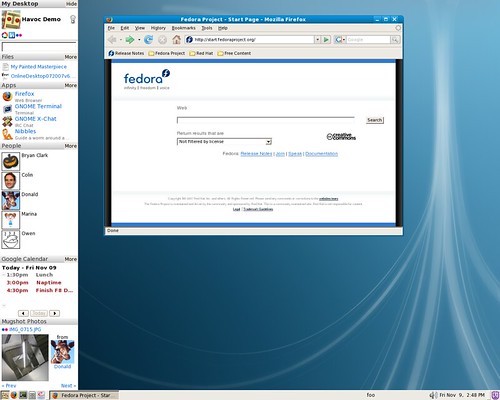
I took a look at Fedora's online desktop a while back, and though that it was cute, but nothing to write home about yet. I want a truly online desktop, though, taking me away from living in my browser, but allowing me to be there if I need to be. No, I don't want Flock, though I think that's a great idea. Here are the things I want:
  • Unified contacts: I want entries in "About Me" for IM, e-mail, and social sites. I want my contacts from all of them to appear in one place, with updates aggregated. Think of an RSS feed for people. I want to be able to click on one of them to chat, e-mail, voice/video, or whatever is supported by the protocols for that connected person. If different services (e.g. Facebook and e-mail) are really the same person, I want to be able to join them into the same contact. Let's beef up Soylent, shall we? We can combine it with Gimmie.
  • I want my e-mail reader to aggregate, as well. I don't care where the e-mail came from. I just need to hit "Reply" and it'll send mail back where it came from. Take my contacts from "About Me" and automatically set it up for me. Pull my message from Facebook or wherever and include them, too. I'm tired of checking for messages in five different places.
  • Calendaring is pretty good now, but could always be better. Evolution uses online calendars and puts them in my desktop calendar. That's cool, except when it doesn't work and the whole panel hangs up. Uck! Make it stable, please.
  • I want my photo organizer aggregated. F-Spot should handle my local files, shares, Facebook, Flickr, and Photobucket photos transparently. When I import new photos, ask me where to put them. Give me the choice to do cross-site backups of all or selected photos/albums.
  • I want my office suite to work with online versions. OO.o already has a Google Docs extension, but it's tedious. I don't want to go to "Google Docs" and hit "Import." I want to choose to open a document and be presented with the Open File dialog with and extra bookmark for Google Docs. Any other major player should have an extension, too, of course.
  • I also want my office software to be my blogging software. There's no reason to use two interfaces for that. Sun sells a nice OO.o extension for this, so I know that it can be done. While we're at it, make an Epiphany extension which is useful for blogging, clips parts of a web page, and copies the stuff over to the office software for me.
  • I want a video aggregator, too. I want Totem to offer me virtually every online video in existence. And no, I don't want to do it from the sidebar. If I have to do it from the sidebar, make sure using it doesn't crew up my keyboard shortcuts like it does now. I just want to think "Play a video" and have a big, searchable list to work with. Local or online, it shouldn't matter. I also want video management for Totem the way Rhythmbox is formatted now.
  • Speaking of Rhythmbox, clean up the plugins. Add more online stores. Make Last.fm easier to use. Let it record streams. Besides all that, I think it's pretty online as it is now. I can pretty much do all my music from there (including creating/ripping audio CDs and editing tags).
So that's about it. I just want it all. Is that too much to ask? ;)

For those who can't hear the playful tone in my voice -- this "whine" is really just a fun way to suggest how we could make the online desktop better. I'm actually quite happy (though not satisfied) with my desktop as it is.

Edit:
I've come up with an addition to my list. My feed reader should work with my video and music player to list attachments which work with those applications. No, I don't want Rhythmbox to be a feed reader. I already have one. I want the feed reader to publish attachments and titles for Rhythmbox to look over and decide which are music. Totem should read the same information. See a feed? Subscribe and don't worry about launching a player from the feed reader. Decide "Hey, I want to watch something." Open Totem. "Oh, hey, there's a new episode of Linux Journal. That sounds good."

Thursday, April 10, 2008

165 linux apps running simultaneously


This is a great example of what can be done on Linux. I'm making a video this week highlighting the default apps on Hardy (stay tuned), and I can open every default application (about thirty) on my three year old laptop without any significant slowdown. Unfortunately, because the SIS900 chipset sucks so badly, any screencasts I do on that machine look like crap, so I'm actually making the video on my newer desktop.

Wednesday, December 26, 2007

Why I Support Using the Default Applications in Ubuntu, Again

Well, I've harped on this before, but I'll rant a little again. Before I start, though, I want to say that I think people can do whatever thay want with their systems. Flexibility is half of what's so great about Linux.

If you are going to use Ubuntu, however, I really believe you should try to stick to the default applications as much as possible. There are two main reasons for this:
  1. Support: Getting support for the default applications is quite easy because everyone has them and the majority of users use the applications. Advanced users get to do whatever they like because they have probably screwed up their systems so many thimes that they know how to get out of any situation. Telling a new Ubuntu user, though, to uninstall fifteen default applications, add another twelve, and change the behavior of everything else on the desktop is a big mistake. The applications that are there work very well for the large percentage of new users. Once they get used to the new system and how it works, they can move into finding and installing alternates. I'm just really tired of trying to support a brand new user on Ubuntu Forums who has followed someone's "How to get the perfect Ubuntu setup" or "Fifteen things you must do to Ubuntu just after installation" howto. They can't use the command line. They're frustrated that programs don't work or aren't consistent, which leads me to my second point.
  2. Consistency: Ubuntu is 95% a Gnome desktop. Gnome has human interface guidelines (HIGs) to ensure that there is a consistent interface on every program and that learning a few basic rules about the system will get a user out of unknown situations. Save is always under File. Preferences are always called exactly that and are under Edit. OK and Cancel are always in the same place. You get the idea. Installing Amarok (a KDE application) breaks all these rules. The new user no longer has a nice, consistent interface to work with and is left having to guess about many things. This is the main reason I support replacing Firefox (an excellent browser) with Epiphany (a decent browser): Epiphany is a Gnome application and is consistent with the rest of the applications in Ubuntu (except for OO.o, but that's another one I'd like to see replaced).
These two reasons are very user-centric: they are good for the new user. From a more developer-centric viewpoint, having Ubuntu users concentrate on the core applications means that these apps will be developed faster with fewer bugs.

p.s. Yes, I change up my desktop, but mostly for the sake of consistency. HEre is a list of extra applications or changes I make (beyond themes)
  • Firefox to Epiphany, explained above. Epiphany is also significanty faster and more stable than Firefox.
  • Deluge-torrent: Deluge is a GTK application and works well with Gnome. The standard Bittorrent client doesn't allow me to run multiple torrents simply while shutting down and restarting. I rarely use it for anything bu Jamendo, anyway.
  • In Preferences -> Removable drives and media, I change the default photo importer from gthumb --import to f-spot-import because I otherwise have to import my photos twice or click ignor, open F-Spot, then import. What a waste of time. Let's choose one photo manager and stick with it.
  • I install Lyx and Referencer to do most of my writing because I want a Latex workfow. OO.o doesn't have that. In addition, OO.o is so bloated that I'd rather use Google Docs. How bad is that?
  • I change my preferred music player from Totem to Rhythmbox so that I get more consistency. I use Rhythmbox to play my music, anyway. Why do I need to open another player?
  • I install and use Empathy instead of Pidgin even though Empathy has fewer features because it is a light, Gome application (Pidgin is not) which will be the default IM client in Gnome 2.22. It has some cool features that Pidgin doesn't have like serverless zeroconf chat and panel applets for my favorite contacts, but I think the best is yet to come for Empathy.
  • I add my most-used applications to the quick launch area on the top panel.
  • I add the Tomboy Notes panel applet because I can easily add or find recent notes there.
  • I change the preferences on the Deskbar applet to include web history, recent documents, and a few others.
That's it. No sweeping changes. I tried AWN, for example, but prefer a taskbar. Just about every change I make tried to improve the consistency Of the desktop. I wish there were a nice, GUIfied Latex editor for Gnome. Lyx is great, but it sticks out and is inconsistent.

Tuesday, December 25, 2007

Top 10 Improved Ubuntu Applications of 2007


Tomboy Notes

Applications -> Accessories -> Tomboy Notes
Tomboy is a C# (Mono) application that burst onto the scene and became the default note manager in Ubuntu, replacing the long-time champ Gnome Sticky Notes applet. Tomboy features sync between computers and a wiki-like style of cross-note linking.

Compiz-fusion

System -> Preferences -> Appearance
The boys at Compiz and Beryl finally got together and worked their problems out. Compiz appeared by default in Ubuntu 7.04, but wasn't enabled. The big push to enable it was made for 7.10. Desktop effects are high on the list of a lot of new Ubuntu-heads. The plugins continue to race forward at a full sprint.

Tracker

Applications -> Accessories -> Tracker Search Tool
While Tomboy is a C# application which replaced one written in C, Beagle Search's C# drag finally got to enough people that Trackerd came in and immediately replaced the more featureful indexer. Tracker is now the default on Ubuntu 7.10.

Xorg

System -> Administration -> Screens and Graphics System -> Preferences -> Screen Resolution
Xorg finally got two things it has needed for ages: changing configuration (like screen resolution or adding a monitor) without restarting, and a graphical interface. I expect Xorg to make the list again in 2008, when Bulletproof X finally takes away many new users' worry of booting into a blinking termnal cursor.

Java

Applications -> Add/Remove -> Sun Java
Java didn't really improve. Installing Java, however, did. Sun released Java under a FLOSS-friendly license, making it installable in the same manner as other applications. The open source versions of Java also progressed enough to run OpenOffice.org' advanced features.

Rhythmbox

Applications -> Sound and Video -> Rhythmbox Music Player
Just about the most important thing for most Rhythmbox users, a plugin was finally included for MTP support, so all those MTP-enabled portable players suddenly became drag-and-drop with Rhythmbox. Suddenly, there was no more need for a command line to update that MTP database.

F-Spot

Applications -> Graphics -> F-Spot Photo Manager
Whatever you think about Mono (it is controvesial), it continues to show its ability to quickly produce full-featured apps. F-Spot has gone from virtually nothing to a great photo manager (with export to virtually every major online service) in just a year. We're still waiting for the plugins to start appearing, though.

GStreamer

Applications -> Add/Remove -> gstreamer0.10-plugins
GStreamer got many new plugins, the ability to use Windows DLLs, and, most importantly, the ability for on-demand installation of codecs. Suddenly, the back end for Gnome's audio and video became viable enough for other desktops to begin looking at using it.

Firefox

Applications -> Internet -> Firefox Web Browser
The actual application didn't improve much this year becaue all the development work is being done on Firfox 3, but Ubuntu made its own contribution by adding easy system-wide installation of common plugins and extensions like flash and java. Ubuntu also put in the apt: handler by default, which means that it's really easy for me to write web-based howtos now.

The Deskbar Applet

ALT-F3
Deskbar became the default place to search for stuff in Ubuntu. Whether you wanted to look through your files, open recent documents, or do a quick web search, Deskbar was the place to go.

Honorable Mention:

These applications aren't installed by default, but they deserve to be mentioned because they are so popular.

VirtualBox

VirtualBox isn't really an Ubuntu application, but it is easily installable, and the open source edition is perfect for anyone who needs to run Windows for that odd application or for testing a new Linux distribution. Of course, KVM, QEMU, and VMWare still remain viable ptions for the average desktop user, too.

Least Improved


Evolution

This monolithic beast continues to stick out like a sore thumb in a Unix world of "do one task and do it well." It is slow and bloated. It has been sitting at virtually the same place for a couple of years, and major bugs in the e-mail client have yet to be solved. I don't know anyone who wants to use it.

Apps which use Telepathy

I know you've probably never heard of Telepathy, but it is the not-so-new "new" Gnome backend for unified chat, VOIP, and video chat. It has so many backends. It connects to the MSNnetwork, Jabber servers like GTalk, AIM, and IRC. It even has this cool little Zeroconf backend which will identify other users on your network and connect to them without a server. It's great. So why is it in the section on disappointments? No one is using it.
Specifically, I've tried to get voice/video over Jabber working on Ubuntu for a friend. There were some mockups of the functionality in 2005. There were some more in 2006. There's still no real way to do it, short of writing my own aplication which uses Telepathy. The framework is there, but no one is writing a frontend to it. Sad. Dissapointing. We need you, Empathy. You're our only hope.

NetworkMonitor

This application let you choose various networks and move between them without major hassle in 2006. People heralded it. Then it broke. Then it broke again. Ubuntu 7.10 shipped without being able to control several open source wireless drivers. Connectios drop. People are frustrated. I'm tired of answering posts about this on Ubuntu Forums.

Other I' Been to Ubuntu Stories

Related Posts with Thumbnails