Friday, February 5, 2010

Answering a Friend About Ubuntu on a Netbook

Ubuntu wordmark officialImage via Wikipedia
This post is directed to a friend that asked about getting a new netbook and putting Ubuntu on it. Facebook ate my homework and gave me nothing but a server error in response, so I decided to put the answer up here and just send him a link.
Thinking of installing Ubuntu on a Netbook we're going to buy as I've heard it's pretty lightweight in comparison to Windows 7. What are your thoughts on this in general? Also, it is free right?
First of all, I want you to know that I use Ubuntu every day. All of the computers in my house (and there are many of them) use Ubuntu or some relative (like Debian). Not only is it free (as in liberty), it's also free ($), and it does everything that I want and more, though there's sometimes a little pain involved. My experiences with Windows don't involve any less pain, though the part of the eye the needles get stuck into isn't necessarily the same.

That said, Windows 7 Starter isn't really any heavier than Ubuntu on a netbook. Sure, Linux and Ubuntu are great in that you can pare down the OS to pretty much any level you want, and you could run a fairly functional, modern desktop using Lubuntu or Slitaz while using the same resources that Windows 98 did. If you buy a netbook with Windows 7 already installed, though, you're going to have enough resources to run pretty much any operating system you want (except Vista), you've already paid for an OS, and the OS is already installed for you. Just stick with it.

If you want to move to an alternate OS (and there are lots of reasons to do so), you'd be best off buying a netbook with Ubuntu already installed and configured for you. Installing and configuring an operating system isn't a simple process, and doing it with an OS you're not familiar with is almost certain to end in disaster. Buying Ubuntu pre-installed means that Dell or whoever did all the grunt work, and probably threw in DVD playback and other goodies, too. (Did you know that Windows doesn't come with that stuff, either?)

If you are still determined to install Ubuntu despite my warnings, here's how you go about it. Learn a little about Ubuntu first and install it once in a situation with little to no danger. Download Wubi, an application which installs Ubuntu like an application inside Windows without touching your Windows system, and is easily removable if you decide you don't want it anymore. Play around a little and see if moving this way is something you really want to do. Don't expect everything to work 100% after the installation.

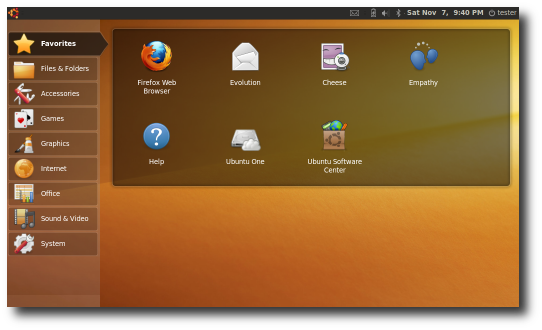
Next, decide whether you want the special netbook interface or the standard panel-and-icon interface. Here they are.
A quick video overview
The standard interface

Once you've decided, head on over to http://www.ubuntu.com and download the one you want and write it to a USB thumb drive. I hear UNetBootin is a very good utility which will both download the image and burn it to a thumb drive for you. Test the finished product on your laptop by rebooting into the live USB environment, which will look like it's native, but which won't touch your laptop at all. Turn off your laptop and get ready to head outside. (Is that the place they keep the soju?)

Head on over to the store you are looking to buy the netbook from and get the salesperson to let you boot the USB key. You know the key works since you tested it at home, right? Hardware compatibility is very important. Look for a netbook based on the Intel Atom and the 945GMA graphics set or get one of the newer ones based on NVidia's Tegra chips. Once the machine boots, test the wireless -- it's in the notification area on the top-right. Does everything work and look OK? Great! You're ready to purchase.

Install the system at home by booting the USB key, clicking the "Install" icon, and following these directions. Read them before you start, but ignore the part about Vista. Once you've finished the installation, open Firefox, come back to this page, and click on the following links to install some extra software:

You're pretty much finished because there are so many applications installed by default. If you need some other application, look in the application store (which is called Ubuntu Software Center) in the "Applications" menu on the top-left of the screen. The standard look is brown (for humanity), but the interface is almost infinitely configurable, and there are tons of themes. Here's my current desktop.


I even have four of them. ;)

p.s. You might want to take a look at Intel's netbook Linux, called Moblin. It's quite innovative.

Lucid Separates Shutdown and "Me" Menus

Lucid has separated the menus used for shutdown and for "Me," a good usability move.

Thursday, February 4, 2010

Google Continues to Make the Same Mistakes (Again and Again)

http://www.makelinux.Image via Wikipedia
A little over a year ago, Google contributed the Android kernel modifications to the Linux kernel maintainers. As of Tuesday, the driver contributions have been deleted. Why? Google used a specially modified kernel API for Android, which is incompatible with the mainline kernel, and attempts to come to an agreement over how to modify and maintain the new code failed.

Google now has two forks of the Linux kernel to maintain. You see, Google started forking and maintaining Linux for its own servers several years ago, and is now having trouble updating and backporting its forked version. Google has come to realize the problem, and is working to move from a proprietary version control system to the Git DVCS which the mainline kernel uses. Google is also trying to clean up the code a little in order to have as much of the code as possible accepted upstream so that the employees have less work to do. This is what the Linux kernel maintainers recommend to everyone.

While Google tries to fix the problem with one hand, though, the company is going down the same road with Android. Because Google can't come to grips with merging the code, the developers will have to maintain that code themselves, leading to a less secure and robust product. Good luck to them.

Google probably just needs to abstract out the parts that change the main kernel's functions and bolt those changes on top.

Monday, January 25, 2010

David Seigel on Improving Launchpad Bug Workflow, or "Developer, Developers, Developers"

Mark Shuttleworth and Canonical Ltd. employees...Image via Wikipedia
David Seigel has a great post, called Improving Launchpad Bug Workflow for Opportunistic Programmers < The Plenitude of Arboreal Beauty. It's not great in that I like the exact solution proposed, but it highlights some important points about Free software development, and the comments are equally interesting.

First, a summary for those not wanting to read the post. David proposes adding a simple link to Launchpad which will help opportunistic programmers fix simple bugs like the ones in 100 Papercuts without having to worry about setting up the proper build environment. Clicking "Quickly fix this bug" installs the proper dependencies and source, opens the preferred editor, and creates a patch when finished.

In effect, David is proposing that Ubuntu prescribe a specific method for bug fixes, including the IDE used. (He proposes using Eclipse.) While this type of policy is likely to rankle many programmers, I believe that having a preferred IDE, language, and toolkit for Ubuntu would be a big step forward. In fact, when Ubuntu started in 2004, I remember Shuttleworth stating that all new work should be done in Python, and that Canonical would be hiring based on this principle. SchoolTool was developed from Zope (IIRC) for this exact reason.

While there certainly have been many new additions to the Ubuntu project which rely on Python since then, we also have GTK-sharp, C, and ECMAScript or JavaScript (e.g. Seed or Gjs). Ubuntu has failed to have a single, defining vision for its product (which Shuttleworth claims he wants) with a preferred development method. I'm not suggesting that there be only one method for development, but both Microsoft and Apple have shown that providing standard tools and languages (VS/.NET and XCode/ObjectiveC, respectively) can create a great developer base. The easier to get involved, the better.

Ubuntu could have a special developers' release which includes all the standard tools necessary to set up and connect to a Launchpad account (for bug fixing and publishing via PPA), an IDE with Ubuntu- and Launchpad-specific plugins, and complete developer documentation. Of course, programmers can continue to use Vim or Emacs or whatever, then use Bazaar from the command line, but new developers would likely just accept the default method Ubuntu provided, and puting "Ubuntu" into the "integrated" part of an integrated development environment would lure many developers. (I had in my notes but forgot to mention that Ubuntu currently is developing Quickly, which appears to be going in the direction I'm proposing. Or it could die like so many other other projects. Wait and see.)

More interesting stuff comes up in the comments section: what is the responsibility for upstreaming? Should bugs be fixed upstream first? Should patches be preferred for upstream? I think these kinds of arguments overlook the strength of FOSS. Ubuntu should fix bugs as it sees fit locally first, and submit those patches or make them easily available (something Launchpad is working hard on). Ultimately, though, many proposed patches will not be accepted by upstream, or they might be delayed by years waiting for a release. If Ubuntu wants to progress, it needs to take responsibility for its own problems and not state that it is waiting on upstream to integrate or fix a patch.


Monday, January 18, 2010

Quick Tip: Speed Up File Transfers to External Storage

External hard disk enclosure from behind. On t...Image via Wikipedia
These days, you might often copy a video file over to an external drive so that you can take that drive to someone's house. The process can run quite slowly if you drag the video file into the destination drive's window but don't close it. Why is that?

In GNOME, Nautilus is trying to create a preview of the video file every time the file changes ... which is constantly. ;) Nautilus is therefore constantly pulling data from your drive and using CPU to create a thumbnail that will be discarded the next second. Since the bus is probably already saturated with outgoing data, Nautilus is causing all kinds of problems there.

Close the drive's window, and Nautilus won't do that, saving time and energy.

Saturday, January 16, 2010

[Phoronix] Google To Switch To EXT4, Hires Ted To Code

[Phoronix] Google To Switch To EXT4, Hires Ted To Code: "Google To Switch To EXT4, Hires Ted To Code"
Google also happened to just hire Ted Ts'o, the widely known Linux kernel developer who is largely responsible for the EXT4 file-system work. According to a blog comment, one of the first things he will be working on while enjoying the Googleplex is EXT4. Hopefully he will be able to drive some better performance back into this file-system that's now used by default in most desktop Linux distributions.
And people always say you can't make money in open source.

Other I' Been to Ubuntu Stories

Related Posts with Thumbnails