

- a set of packages to create a robust set of file, mail, DNS, IM, primary domain controller (PDC), LDAP, VPN, and firewall servers on top of an existing Ubuntu installation; or
- a stand-alone distribution CD to do the same.
eBox prides itself in its simplicity and the automation of common enterprise system administrative tasks. It differs from a similar project, Webmin -- probably the most popular administration UI in Linux -- in that eBox hides many of the dirty details and creates a system with reasonable defaults. We can get an idea of the philosophical difference by looking at screenshots of the two projects.

Setting up a DHCP server in eBox
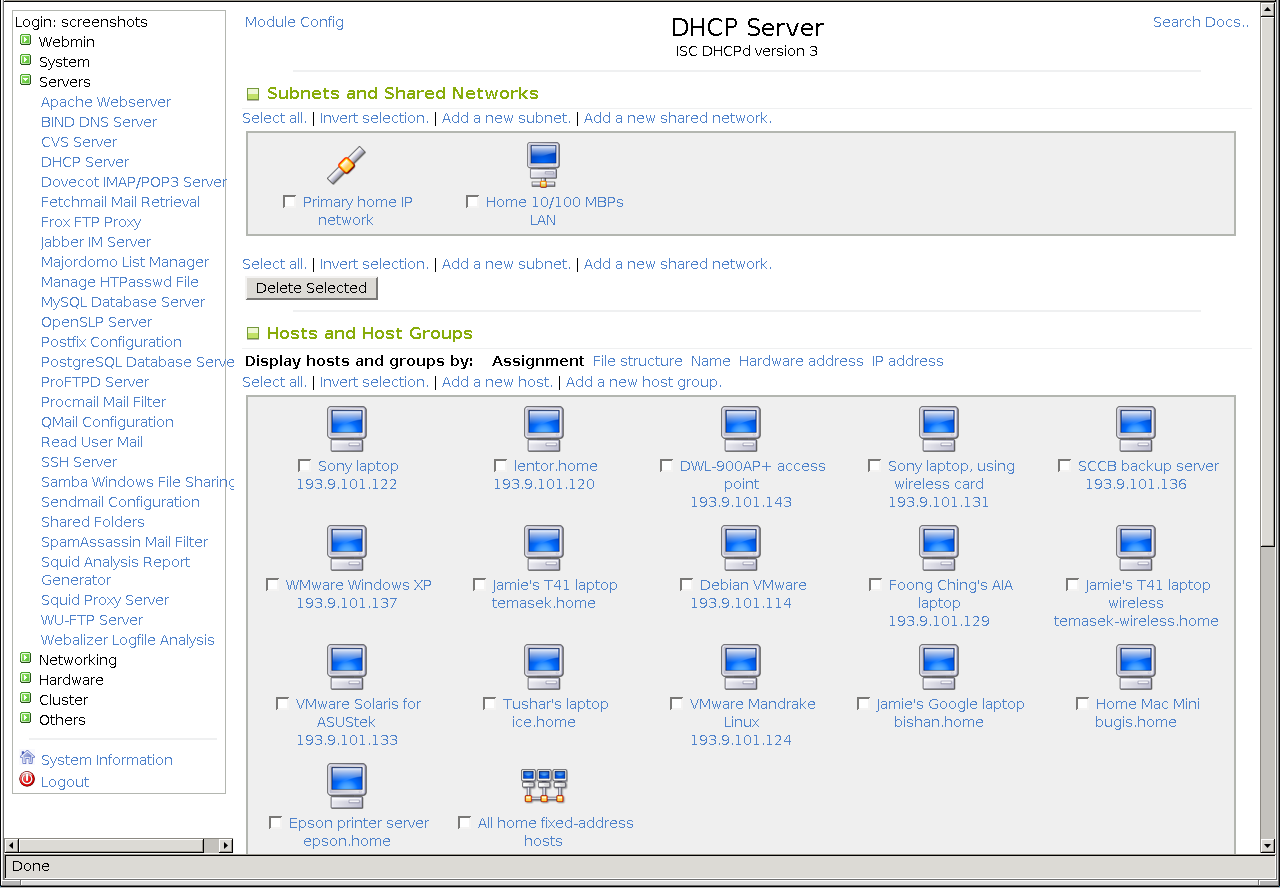
Setting up a DHCP server in Webmin
You can see the fundamental difference between the two. Experienced admins will either prefer Webmin or just use SSH, but eBox offers a safe way for former Windows admins to adjust to a Unix/Linux world.
Networking is object oriented, and this allows eBox to work well as a firewall with traffic shaping or caching proxy (even transparent). It can handle DHCP requests or operate as a local DNS (cache or full) or NTP (time) server. Teh VPN functionality lets "road warriors" have access to the business intranet while away from the office, and can even connect two offices permanently so they appear to be on the same network.
By default, eBox uses LDAP to store user information, meaning that it is probably the easiest way to get an LDAP server up and running. There are numerous horror stories and multi-page howtos for the would-be OpenLDAP users. All the services are tied into LDAP, so you can run a Windows PDC and an LDAP server side by side without having to sync users. DHCP even supports booting diskless thin clients.
Printers are handled using the CUPS printing server, but eBox uses its own integrated configuration UI instead of CUPS'. Printers are shared equally well to Windows, Linux, or OS X machines.
File sharing uses Samba, unsurprisingly. Simple file serving is offered as well as PDC capability. Quotas and roaming profiles are available with the check of a box. In addition to user shares, group shares for teams are also available.
Not only is mail handled, with POP3 and IMAP, but it is possible to use virtual domains for the mail and mail aliases are supported. If your business uses internal IM in addition to mail, the Jabber server is simple to set up.
Think all this functionality is too much for a single server? You're right. eBox knows this and offers a SOAP interface so that multiple boxes -- even geographically diverse ones -- can be controlled from a single interface.
Certified courses for administrators have begun to pop up, and the future looks bright for such a young project. Version 1.2 promises more options like PBX (Asterisk), filters for the web proxy, IM proxies, and intrusion decetion system (IDS) integration via Snort.
Download the eBox live CD and take a look. Installation disks and packages are also available.
![Reblog this post [with Zemanta]](https://lh3.googleusercontent.com/blogger_img_proxy/AEn0k_vHzYVX4z9h42UNV4Xqpawy1sJd_dQAxc9Yuw5EyG6URcrLDtbdIuYzoctPd3wP27uEkUBSGfP0-RuHk4lEAaFkLOTeMUqlzvWOCBbetionZd8rt519Oul68zMfHxTC_B9kAOPq-Fl_Jy7DYXHdJenw=s0-d)


![Reblog this post [with Zemanta]](https://lh3.googleusercontent.com/blogger_img_proxy/AEn0k_vEoYFHqswTZA0DWiHFZ-JiMsP4A6zu1wKlfqdwAlxiWvgE_B0HXd4K5rI6Xe_hBeADYgOF0610ZhrlD_Dz7KIJWN2H7z7HWKDIabk3MDaJCqmk-abhdqJ-Iypidk9nJZepHa5GszjEQLyCbckmXoZr=s0-d)
