- That changing incorrect instructions couldn't be done because it would break translations (which were also, obviously, incorrect and already broken). -- Debian and Ubuntu developer.
- That a virus destroyed someone's hard drive. -- A friend
- That this same hard drive had to be replaced for 110K won (~$100) when it was still only a month old and under warranty. -- same friend (Sorry, dude -- you're on the list twice.)
- That employees "worry too much about what's in their contract." -- Superintendant of the shool district when she tried to make everyone work unpaid overtime.
- "Do you want to hamburger?" -- An English teacher for the district teaching a unit on want.
- "How do I install a .tar.gz? When I type 'dpkg -i file.tar.gz'' it fails." -- System administrator.
- "Your an idiot." -- Sogoodsofarsowhat
- "I made the front page of Digg." -- Me (Like ... who cares?)

Wednesday, December 31, 2008
Dumbest things I was told in 2008
Some of these are computer related, but some aren't.


Sunday, December 28, 2008
Microsoft's ODF Plans -- Business as Usual.
It what is probably the least shocking development of the holidays, Microsoft's announced support of ODF in MS Office 2007 SP2 will not be interoperable with other implementations of the standard.
Microsoft has announced that ODF will be implemented in Office 2007 SP2, due out between February and March of 2009. Under MS's Document Interoperability Initiative (DII), a preview of the implementation strategy has been released, but it varies significantly from other suite's current implementation of the standard, ODF Alliance Managing Director Marino Marcich said in an interview with PCWorld. He claims that MS's course will break interoperability.
I feel like I should be writing for BoycottNovell now, but I can honestly say that very few people I've talked to over the last year expected MS to do anything different than the announced plan. Most of us expected MS's ODF to behave in strange ways that would break any chance for other office suites to get a fair shake.
MS's OOXML doesn't meet the specs and is thus a lock-in. MS's ODF is intentionally breaking interoperability, giving people the impression that either the standard or the other office suites are sub-standard. It appears not as much has changed in Redmond as what many tech writers would have you believe.
Business as usual at MS.
Microsoft has announced that ODF will be implemented in Office 2007 SP2, due out between February and March of 2009. Under MS's Document Interoperability Initiative (DII), a preview of the implementation strategy has been released, but it varies significantly from other suite's current implementation of the standard, ODF Alliance Managing Director Marino Marcich said in an interview with PCWorld. He claims that MS's course will break interoperability.
I feel like I should be writing for BoycottNovell now, but I can honestly say that very few people I've talked to over the last year expected MS to do anything different than the announced plan. Most of us expected MS's ODF to behave in strange ways that would break any chance for other office suites to get a fair shake.
MS's OOXML doesn't meet the specs and is thus a lock-in. MS's ODF is intentionally breaking interoperability, giving people the impression that either the standard or the other office suites are sub-standard. It appears not as much has changed in Redmond as what many tech writers would have you believe.
Business as usual at MS.
Thursday, December 25, 2008
Thirty Years of Computing and Eleven Using Linux

I realized, though, that I've spect very little of my life using MS Windows -- probably under five years. That still doesn't get me out of tech support for my friends.
Merry Christmas!
Monday, December 22, 2008
A PDC the Easy Way

The eBox install disk weighs in a 560MB and is based on Ubuntu 8.04. In fact, The install is in two parts. The base Ubuntu system is installed, the system reboots, and the rest of the eBox system is installed. This kind of reminds me of the old, two-stage Debian install. Everything is on the disk so you don't need network access if you can't get hooked up.
In addition to Samba, eBox has an LDAP server. That means that eBox can serve as a bridge while you start a migration from Windows to another oprating system. Since I've never seen an easy LDAP installation, eBox seems the way to do that.

If you want a cut-down version of eBox, it can operate as a firewall and VPN system, too. Each of the modules can be deactivated or removed to trim the system down.
Still not convinced? There's a web server with user shares, a mail server with quotas, a Jabber server, a DHCP server, a print server, and a proxy server with Dansguardian.
If you are one of the few small businesses which doesn't have an actual server yet, consider using eBox.
Is it brain-dead easy? No. You'll need just as much know-how to set this up as you would getting a Windows Server PDC going and secure. Once eBox is going, you should be good for the next four years. There are no client licenses to buy or limitations on number of connections, either.
Consider it, eh, Tommy? Save me some headaches.
Tuesday, December 9, 2008
Would you lease a computer?


UK providers are increasingly offering free laptops or netbooks with a signed data contract. This brings up a questions about whether you would lease a notebook or not.
If the provider offered free use of a netbook or notebook (your choice) with basic needed software for a two-year data contract, would you go for it? The machine would, of course, be under warranty for that entire time, and after two years, you would turn it in and receive a newer model if you signed up for another two years.
Would it work for you? Do you need to own your machine? What kinds of ToS clauses would turn you off from such a deal?
See the sidebar for a poll.
Saturday, December 6, 2008
Linux, The Perfect Gift, on Sale Now at Amazon.com
Amazon has three Linux-based netbooks on sale for the holidays, at up to 24% off.
ASUS Eee PC 900 8.9-Inch Netbook -- $417
 This one is the one I'd get if I were in the U.S. At 24% off retail, it's a steal.
It comes with:

It's only 3% off, but has a larger drive and better battery:
HP 2133-KX869AT 8.9-inch Mini-Note PC -- $533

This one is more expensive, an older base model (with Via chip), and only 8% off, but it has had wonderful reviews, especially for the keyboard. I wouldn't want the hard disk, though.
ASUS Eee PC 900 8.9-Inch Netbook -- $417
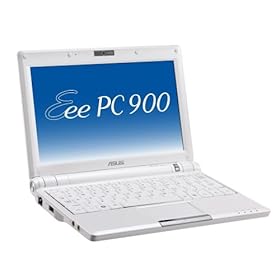
It comes with:
- 1 GB RAM,
- 20 GB Solid State Drive,
- Xandros Linux,
- and a 4 Cell Battery
ASUS Eee PC 1000 10-Inch Netbook -- $481

It's only 3% off, but has a larger drive and better battery:
- 1.6 GHz Intel Atom N270 Processor,
- 1 GB RAM, 40 GB Solid State Drive,
- Xandros Linux,
- 6 Cell Battery
HP 2133-KX869AT 8.9-inch Mini-Note PC -- $533

This one is more expensive, an older base model (with Via chip), and only 8% off, but it has had wonderful reviews, especially for the keyboard. I wouldn't want the hard disk, though.
- C7-M 1.2 GHz Processor,
- 1 GB RAM,
- 120 GB Hard Drive,
- Suse Linux
Thursday, December 4, 2008
Want Your Friend to Switch?
Do a friend a favor. Don't sell him Linux. Don't try to "convert" him, please. If he is actually interested, give him something as simple and Windows-like as you can. I generally go for Linux Mint. It's got the stuff in the right place. Thoroughly check hardware support, make sure your friend can play all his media, and check that he can use all his peripherals BEFORE you convert anything over. Don't even start if there's any question. Back up ALL his data for him.
Set the thing up for unattended upgrades. Install SSH and get a dyndns account so that you can admin his box from wherever you are. Then be prepared to spend some serious time helping him get used to those little things that are different. He's going to need it.
Make converting to Linux the best experience of his life. Please. I don't need to read any more "My friend wanted me to try Linux but now I'm stuck at a text prompt and this sucks" blog posts.
Set the thing up for unattended upgrades. Install SSH and get a dyndns account so that you can admin his box from wherever you are. Then be prepared to spend some serious time helping him get used to those little things that are different. He's going to need it.
Make converting to Linux the best experience of his life. Please. I don't need to read any more "My friend wanted me to try Linux but now I'm stuck at a text prompt and this sucks" blog posts.
Subscribe to:
Posts (Atom)
Other I' Been to Ubuntu Stories
