There's some great conversation going on over the tech boards and tech news sites I visit. They revolve around the use of marketing in Open Source offerings, and whether the little white (or not so white) lies and FUD are just a part of doing business.
Since long before I ever got into computers, the business has been the same. Salesmen resemble the used-car variety. They said whatever they needed to get you to buy. First it was expensive mainframe hardware, which generally came with free software, by the way. Next, once the business computer started in, they wanted to sell you the whole suite of hardware and software. Once the PC became a commodity item, they sold you the software, locked down in any way possible to keep you from moving to other software.
They were able to follow the car sales method because computers and the software were big ticket items, and once you were with a particular vendor, it was extremely hard to move. After the sale, you found out that many of the touted features didn't actually work as advertised or at all, but you'd sunk so much money into the system already that you were committed and couldn't just scrap it all and start over. Even if you did start over, the other vendors were all likely to lie to you, too. Buyer beware, eh?
This kind of business stopped some time back for mainframe vendors. Clusters of PCs can now outperform the heavy metal on many tasks. Regular PCs and servers perform 75% of the other tasks mainframes used to be called on to do. No, the market isn't dead. The people who need mainframes know who they are and have investigated the other options before making the hard decision to lay down the cash for the big machines. Mainframes are still sold and are still somewhat profitable, but the vendors can't lie and cheat their way in anymore. Losing credibility is too important.
The PC market used to be fractured. In the early day, different architectures, busses, and adapters meant that you got locked in. Thankfully, we've settle on indutry standards like ISA, PCI, AGP, USB, and PCIe for some time now. Imagine if your computer came with a proprietary monitor jack which only worked with the vendor's overpriced monitors. That's the way it used to be, folks. No more, though, thankfully. Don't like your monitor, just walk in to any tech store and buy a new one from any manufacturer you want. Graphics card too slow? Buy another from any of several vendors, on-line or off. No room to lie in marketing literature, or the customer will simply return the item and buy from someone else, telling friends how awful the experience is.
Sadly, the practice isn't completely gone: old habits die hard. NVidia and ATI were both recently in the news over advertising features which their cards didn't actually have. They got away with this for a short time because the features they were touting (like Vista and DX10 compatability) weren't available to consumers for months after purchase. Once the consumers discovered the ploy, they'd already used up a good portion of the life-cycle of the graphics card. ATI's reputation suffered for years after it was found that it used its driver to cheat on benchmarks. Graphics card makers seem to be about the only ones left who follow this despicable practice.
Oh, and software houses. We can't forget them, can we? Announced features for future versions of one vendor's software are announced to take the limelight away from newly released software from other vendors' offerings. Microsoft is especially good at this method. Whether those features ever appear in the final product (or even whether the product ships) is not really important. What is important is limiting your competitors' ability to market effectively. Fear, uncertainty, and doubt (FUD) were first used by IBM during the mainframe days, but the method was co-opted by Microsoft (and some say perfected by them). FUD is now an industry standard way to deal with competitors' innovations.
This is why we need real software standards. Quickbooks is a great accounting application, but few people can just pick up and move to another one without losing a lot of old, important data. MS Office is undoubtably the most advanced Office suite available, but what does a business do if it realizes that it doesn't need the advanced features anymore? It can't keep using the same softwar forever: once MS decides the software is at its end-of-life, the business gets no more support or security updates. The company has to move to new software, and data in the old format keeps the business from moving to any vendor other than MS.
We need PDF, HTML, XML, SQL, and other real standards for program data. ODF (Open Document Format) is an ISO standard for office documents. We should be using it. SVG is a standard for vector graphics. Flash is not. We should be using the former, not the latter. We need similar standards for other common formats, like accounting software. Until our software gets onto standards the same way hardware did, software houses will continue to give us the same old song and dance, shining us on while they pocket our money in exchange for empty promises.
Right now, Microsoft is trying to push a software standard through ISO, resorting to buying votes whenever it needs to. This standard is effectively useless for any software house except Microsoft's own. It will give them the illusion of following a standard (getting around government requirements) while still locking the users into perpetual MS Office use. Be vocal. Say no to OOXML.

Wednesday, October 3, 2007


Friday, September 21, 2007
How to Make Ubuntu Look Like Vista (Kind of)
So you're a new Ubuntu user who really wishes your computer looked more like Windows (maybe Vista). Here's a quick and dirty way to make that dream happen. You'll need to install Gnome Art Manager before you start.
The final product will look like this:
Here's the video:
How to make your Ubuntu desktop look like Windows Vista (sort of)
The final product will look like this:

Here's the video:
How to make your Ubuntu desktop look like Windows Vista (sort of)
Thursday, September 20, 2007
Make Ubuntu Look the Way You Want
I made a short (and not too good) video about how to use Art Manager to change the look of Ubuntu 7.10.:
Change the Look and Feel of Ubuntu
Change the Look and Feel of Ubuntu
Saturday, September 15, 2007
Something About This Seems Ironic
The big news today for Linux users is that new iPods won't work under any of the available Linux software due to a new security method Apple implemented. They will Only work with iTunes. Hmm. Bad news for Linux, eh?
It is bad news, and seems insurmountable until you look at the changelog for the verion of Wine released today (Wine assists users in running Windows apps on Linux and other Unix-type systems). Right there at the top -- "Many improvements to the crypto dlls (should make iTunes work)."
Update: The database was cracked within a week. The new library is equipped to handle the new iPods.
It is bad news, and seems insurmountable until you look at the changelog for the verion of Wine released today (Wine assists users in running Windows apps on Linux and other Unix-type systems). Right there at the top -- "Many improvements to the crypto dlls (should make iTunes work)."
Update: The database was cracked within a week. The new library is equipped to handle the new iPods.
Friday, August 31, 2007
The Storm Worm ... Again!!!
Well, the Storm worm (actually a trojan) is making its rounds again,
this time using blogs and youtube.com as a phishing front.
this time using blogs and youtube.com as a phishing front.
The victim reads a blog and sees a link to a funny YouTube video. Who
wouldn't click that, right? The link leads not to youtube, but to a
phishing site which hand-crafts a page based on the browser and
version, putting an exploit right in there with the HTML.
How to get infected in Windows:
See an interesting blog, click the link. Presto! You've got Storm!
How to get infected in Ubuntu:
Quoted from http://www.gnu.org/fun/jokes/evilmalware.html
1. Put the attachment into the appropriate directory eg. /usr/src
2. Type `tar xvzf evilmalware.tar.gz' to extract the source files for
this virus.
3. `cd' to the directory containing the virus's source code and type
`./configure' to configure the virus for your system. If you're
using `csh' on an old version of System V, you might need to type
`sh ./configure' instead to prevent `csh' from trying to execute
`configure' itself.
4. Type `make' to compile the package. You may need to be logged in as
root to do this.
5. Optionally, type `make check_payable' to run any self-tests that come
with the virus, and send a large donation to an unnumbered Swiss bank
account.
6. Type `make install' to install the virus and any spyware, trojans
pornography, penis enlargement adverts and DDoS attacks that
come with it.
7. You may now configure your preferred malware behaviour in
/etc/evilmalware.conf .
Sometimes ease of use is not what you want...
Sunday, August 26, 2007
"Help! I can't delete files off my external hard disk!"
I got this call from my friend who's a new Ubuntu user. He didn't understand why that was. I agree that it's confusing for new users.
I haven't checked his drive yet, but since he can't delete the files even as an administrator (root via sudo), I believe that the drive he's using is formatted for Windows XP. The filesystem is called NTFS. Older windows versions used a filesystem called FAT, which is what I put on external hard disks for maximum ease of use.
NTFS has permission settings and a lot of other really good stuff that FAT (and later VFAT) didn't have. It's not well documented, so Linux support has been a long time coming for it. Linux developers have the same problem with some kinds of hardware -- when you have to reverse engineer everything, it takes a long time to get all the features.
After quite a few years with NTFS, though, Linux is pretty stable with it. It is not, however, installed by default in Ubuntu 7.04 (Feisty). To do that, you'll need to open the Add/Remove dialog in the Applications menu:
In the search dialog, put in ntfs, wait about five seconds for the search, and you'll see the NTFS configuration tool.
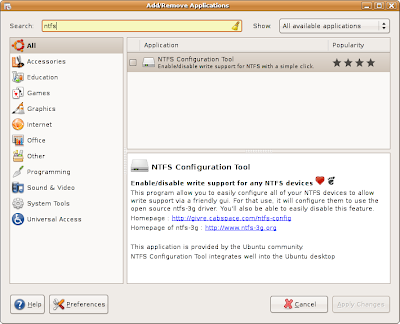
Check the box next to the program, click Apply Changes, and type in your password. After about a minute, the program will be installed and you can close the window.
Next, insert your external hard disk and open the NTFS configuration tool located in Applications -> System Tools.
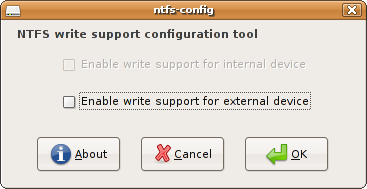 Click on the check box next to Enable write support for external device and click OK.
That's it! You're done. Your external drives shouold now work with no problem.
Please feel free to write any comments or questions.
I haven't checked his drive yet, but since he can't delete the files even as an administrator (root via sudo), I believe that the drive he's using is formatted for Windows XP. The filesystem is called NTFS. Older windows versions used a filesystem called FAT, which is what I put on external hard disks for maximum ease of use.
NTFS has permission settings and a lot of other really good stuff that FAT (and later VFAT) didn't have. It's not well documented, so Linux support has been a long time coming for it. Linux developers have the same problem with some kinds of hardware -- when you have to reverse engineer everything, it takes a long time to get all the features.
After quite a few years with NTFS, though, Linux is pretty stable with it. It is not, however, installed by default in Ubuntu 7.04 (Feisty). To do that, you'll need to open the Add/Remove dialog in the Applications menu:
In the search dialog, put in ntfs, wait about five seconds for the search, and you'll see the NTFS configuration tool.

Check the box next to the program, click Apply Changes, and type in your password. After about a minute, the program will be installed and you can close the window.
Next, insert your external hard disk and open the NTFS configuration tool located in Applications -> System Tools.
 Click on the check box next to Enable write support for external device and click OK.
That's it! You're done. Your external drives shouold now work with no problem.
Please feel free to write any comments or questions.
Tuesday, July 10, 2007
What's Coming in Ubuntu 7.10 (Gutsy Gibbon)
I've upgraded to the Alpha version of the next Ubuntu release and have some insight into the changes that are being made. Here's a quick list of what I've seen so far.
The Gimp Image Editor
The Gimp is an old stand-by of the Linux world, and the father of the Gnome desktop. Many people complain about the interface, but I don't often have problems with it. The Gimp has stayed on version 2.2 for a couple of years now, but there's a major rewrite and UI cleanup due in 2.4. Ubuntu 7.10 has started shipping the development version of The Gimp, with 2.4 scheduled to be in when they both go gold. The new icons make seeing what's going on a little easier.
Office
Evince Document Viewer
The default PDF viewer will have support for forms. Good news for those people who don't want to install the dog Adobe calls Acrobat Reader. There will also be annotation and multiple-page per sheet printing.Evolution Personal Information Manager
Better spam handling and a Google calendar backend may actually bring me back from my all-online-PIM life.Graphics
The Gimp Image Editor
The Gimp is an old stand-by of the Linux world, and the father of the Gnome desktop. Many people complain about the interface, but I don't often have problems with it. The Gimp has stayed on version 2.2 for a couple of years now, but there's a major rewrite and UI cleanup due in 2.4. Ubuntu 7.10 has started shipping the development version of The Gimp, with 2.4 scheduled to be in when they both go gold. The new icons make seeing what's going on a little easier.F-Spot Picture Manager
I'm writing an introduction piece about this software right now (in the style of the movie and music entries last month). It's a nice piece of work. I'm not as familiar with it, so I might miss some of the new features. The photo editing tools are better now, with horizon adjustment, soft focus, and auto-color adjustment.Internet
GAIM ... er ... Pidgin
Making me feel right at home (Hawaiian), GAIM has been renamed to Pidgin due to a suit from AOL. The interface has been cleaned up and it offers more stability. One of the major additions due in the next version is implementation of the MySpaceIM protocol. Since the MySpace client is only available on Windows, this will allowfolks that I know to chat with each other. I won't affect me one little bit, though.Gnome has Telepathy
Gnome is starting to integrate IM, voice, and video chat at the deepest levels of the desktop. You can now have panel applets to chat with your most common contacts. Soon, any application will easily integrate voice or video chat. Your Evolution addressbook will double as your IM contact list. Cool beans!Ekiga Softphone
This is a standards-based softphone which operates in a manner similar to Skype. The rates for landline calls are cheaper, too, but it can't contact any Skype members because Skype uses a closed protocol. Version 3.0 will see a completely new interface, with the ability to see whether contacts are online, available, on a call, etc. This is a feature which has been sorely missing. Complete audio and video support are also due. Can I make a request for a test call like Skype's?Sound and Video
Movie Player
The movie player (Totem) is seeing more work done on automatically locating and installing codecs for you. GStreamer, the backend for the player, is seeing quite a few upgrades. There is a new plugin for making annotations on the screen.Rhythmbox Music Player
The player is still sleek and easy to use, but it has seen some minor upgrades. The Jamendo and Magnatune store listings have been moved to their own section of the sidebar, "Stores." The are auto playlists for top rated, recently added, and highest ranked songs. Most interestingly for my friends, the is MTP support in the new version, meaning they can just drag and drop songs to their iRiver Clix without having to run a script afterward.Conclusion
There are probably a million thing under the surface which I haven't touched on, but the major players are getting enough of a facelift that 7.10 looks to be a must-have upgrade for anyone using 7.04.
Subscribe to:
Posts (Atom)
Other I' Been to Ubuntu Stories
